 Capital de Tokens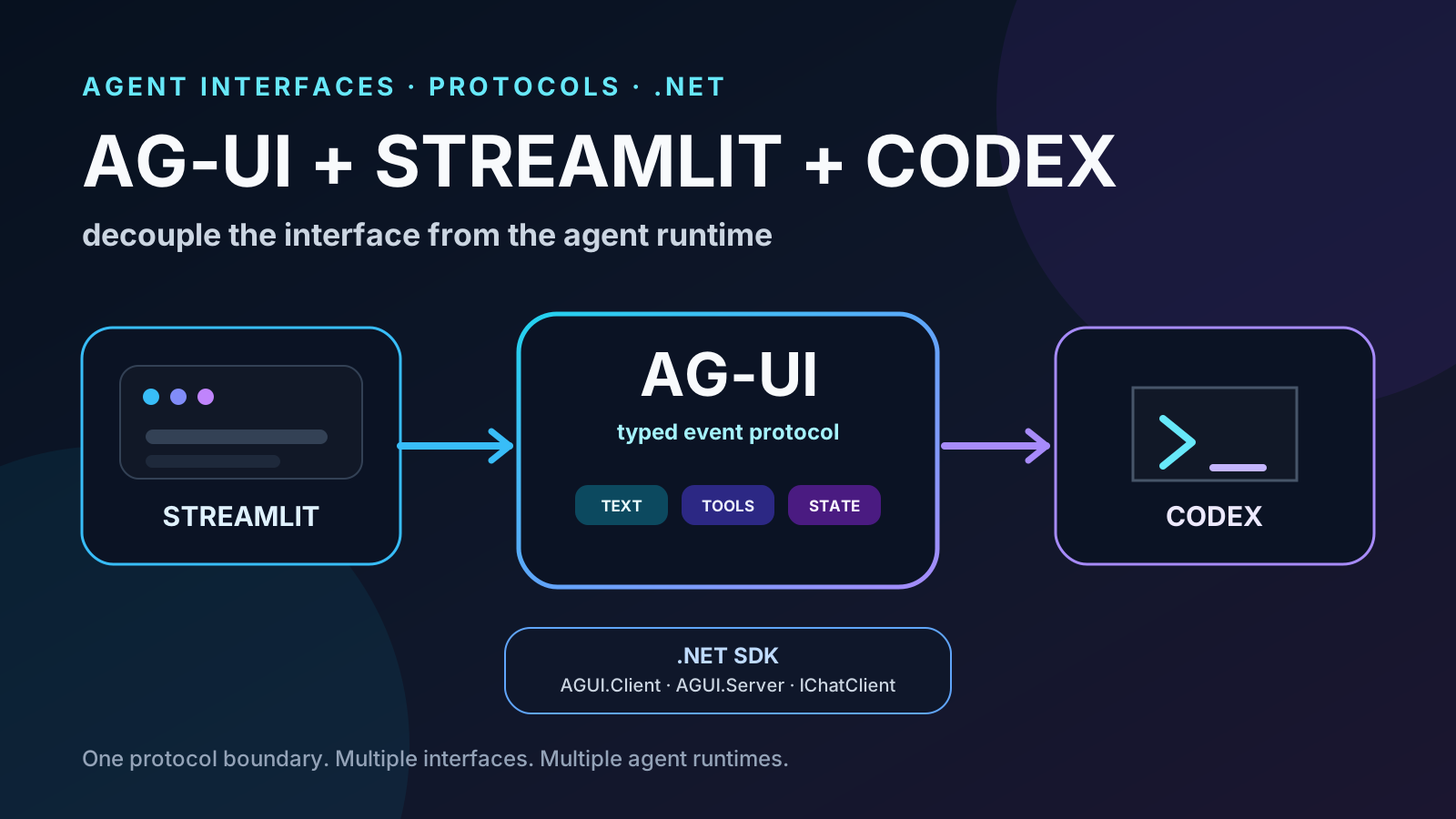
On September 25, 2026, Microsoft published something that may matter more than it first appears for teams building agent products: AG-UI now has a first-class .NET SDK.
Primary source: Microsoft .NET Blog — AG-UI Protocol now has a first-class .NET SDK
This is not merely another NuGet package. The proposal is that any .NET service can speak AG-UI directly and that an application can consume a remote agent through the normal Microsoft.Extensions.AI abstractions.
That enables a useful architecture:
interface
   │
   │ AG-UI
   ▼
agent / runtime
The interface no longer needs a private integration for every agent framework, and the runtime no longer needs to know how every event will be rendered.
From there, a particularly interesting combination appears for prototypes and internal tools:
Streamlit
   │
   │ AG-UI
   ▼
adapter
   │
   ▼
Codex
This article first looks at the .NET SDK Microsoft just introduced and then answers two practical questions: can Streamlit act as an AG-UI client? and can Codex sit behind that protocol?
The short answer to both is yes, with important caveats.
Status verified on September 27, 2026. AG-UI and Codex are moving quickly; review the linked primary sources before freezing a production architecture.
First: what exactly is in the AG-UI .NET SDK?
Microsoft built the SDK with CopilotKit and contributed it to the main AG-UI repository, next to the TypeScript and Python SDKs. It is published on NuGet under the MIT license.
The SDK ships as five packages:
| Package | Role |
|---|---|
| AGUI.Abstractions | Protocol types: events, messages, tools, capabilities, interrupts, state, and serialization |
| AGUI.Formatting | Wire-format abstractions; includes default SSE support |
| AGUI.Protobuf | Optional protobuf codec for a subset of events |
| AGUI.Client | Consumes AG-UI endpoints |
| AGUI.Server | Exposes an agent as an AG-UI endpoint |
Source: Microsoft .NET Blog — The packages
Most applications only need to decide which side they are on.
For a backend:
dotnet add package AGUI.ServerFor a consumer:
dotnet add package AGUI.ClientIChatClient is the integration point
One of the most important design choices is the use of Microsoft.Extensions.AI.IChatClient.
An agent does not need to adopt an entirely separate API just to speak AG-UI. It can keep the abstraction already used across the .NET AI ecosystem.
On the server side:
IChatClient
   │
streaming response
   │
   ▼
AGUI.Server
   │
SSE / AG-UI events
   ▼
client
In the other direction, AGUI.Client includes AGUIChatClient, which also implements IChatClient.
So a .NET application can look like this:
.NET application
      │
   IChatClient
      │
AGUIChatClient
      │
    AG-UI
      │
Python / TypeScript / C# agent
Microsoft shows a client setup like:
using AGUI.Client;

using var httpClient = new HttpClient();

var chatClient = new AGUIChatClient(
    new(httpClient, "http://localhost:5001"));
Source: Microsoft .NET Blog — AG-UI .NET quickstart
Microsoft Agent Framework now builds on this SDK
Microsoft Agent Framework already had AG-UI support, but its .NET integration now depends on the shared AGUI.* packages.
The hosting model becomes compact:
builder.Services.AddAGUIServer();

AIAgent agent = chatClient.AsAIAgent(
    name: "AGUIAssistant",
    instructions: "You are a helpful assistant.");

app.MapAGUIServer("/", agent);
Microsoft says the wire format is unchanged, so existing frontends can continue working against an upgraded backend.
That matters because AG-UI is no longer just an implementation detail inside a specific Microsoft agent framework. It becomes a reusable protocol layer available to ordinary .NET services.
What problem is AG-UI trying to solve?
Agents break the traditional request-response pattern.
An agent may:
- run for minutes;
- stream text;
- invoke tools;
- request human approval;
- update shared state;
- delegate to subagents;
- pause and continue;
- emit intermediate results.
Without a common protocol, every backend invents its own stream.
The UI ends up coupled to framework-specific events:
LangGraph events ─┐
CrewAI events ────┼── custom UI logic
framework X ──────┤
runtime Y ────────┘
AG-UI tries to replace that with a shared contract.
The project describes itself as an open, lightweight, event-based protocol connecting agents to user-facing applications.
Source: AG-UI — README
Its events cover:
- run lifecycle;
- text messages;
- tool calls;
- state synchronization;
- activity and progress;
- subagents;
- custom events.
Source: AG-UI — Events
Text, for example, follows an explicit lifecycle:
TEXT_MESSAGE_START
        ↓
TEXT_MESSAGE_CONTENT
        ↓
TEXT_MESSAGE_CONTENT
        ↓
TEXT_MESSAGE_END
Tool calls have a separate lifecycle:
TOOL_CALL_START
      ↓
TOOL_CALL_ARGS
      ↓
TOOL_CALL_END
      ↓
TOOL_CALL_RESULT
This is far easier for a UI to reason about than free-form output.
AG-UI does not replace MCP
The protocols solve different boundaries:
user
 │
 ▼
interface
 │
AG-UI
 │
 ▼
agent
 ├── MCP ── tools and data
 │
 └── A2A ── other agents
AG-UI itself presents the stack this way: MCP gives agents tools, A2A connects agents, and AG-UI brings agents into user-facing applications.
Source: AG-UI — protocol stack
They can coexist in one system.
What about Streamlit?
This is the first important caveat.
Streamlit is not currently listed as a first-class supported AG-UI client.
The main repository lists clients such as CopilotKit, terminal, chat platforms, and React Native.
Source: AG-UI — Clients
There is also a community discussion specifically asking about Streamlit and Gradio support.
Source: AG-UI discussion #538 — Streamlit or Gradio frontend support thoughts
But that does not make Streamlit incompatible.
AG-UI’s client quickstart explicitly says that a client does not have to be a web application. Anything capable of consuming the event stream and presenting it to a user can be a client.
Source: AG-UI — Build clients
So Streamlit can become an AG-UI client through an adapter.
Streamlit
   │
   │ HTTP / SSE
   ▼
AG-UI endpoint
   │
   ▼
agent
Mapping AG-UI into Streamlit
A first version can handle only a small event set:
AG-UI                         Streamlit

TEXT_MESSAGE_CONTENT   →     st.chat_message / st.empty
TOOL_CALL_START        →     st.status
TOOL_CALL_RESULT       →     st.expander / st.json
STATE_DELTA            →     st.session_state
RUN_STARTED            →     working indicator
RUN_FINISHED           →     finalize status
Conceptually:
async for event in agui_stream:
    match event["type"]:
        case "TEXT_MESSAGE_CONTENT":
            render_text_delta(event)

        case "TOOL_CALL_START":
            show_tool_started(event)

        case "TOOL_CALL_RESULT":
            show_tool_result(event)

        case "STATE_DELTA":
            update_session_state(event)

        case "RUN_FINISHED":
            finish_run(event)
This covers a large part of the value for a prototype.
The harder problems begin with multi-agent updates, interrupts, frontend tools, approvals, and highly concurrent state. Streamlit has a different execution model from a typical React application, so richer agent experiences may require custom components or an additional state layer.
AG-UI does not remove that constraint. It removes the need to invent the protocol too.
Can Codex sit behind AG-UI?
Yes.
The simplest model is to treat Codex as another runtime producing structured events.
Streamlit
   │
 AG-UI
   │
adapter
   │
Codex
   │
repo / shell / tools
The real design choice is which Codex surface to use.
There are three especially relevant options.
Option 1: codex exec —json
This is the simplest integration for automation and headless workloads.
Codex can run non-interactively and emit structured JSONL events.
An adapter can launch:
codex exec --json --ephemeral "Diagnose the failing tests"and translate the stdout stream into AG-UI.
Conceptually:
Codex                         AG-UI

thread.started        →       metadata / start
turn.started          →       RUN_STARTED
agent_message         →       TEXT_MESSAGE_*
command_execution     →       TOOL_CALL_*
file_change           →       state/custom event
turn.completed        →       RUN_FINISHED
turn.failed           →       RUN_ERROR
A Python adapter could look roughly like:
proc = await asyncio.create_subprocess_exec(
    "codex",
    "exec",
    "--json",
    "--ephemeral",
    prompt,
    stdout=asyncio.subprocess.PIPE,
)

async for line in proc.stdout:
    codex_event = json.loads(line)
    for agui_event in translate(codex_event):
        yield agui_event
This route is attractive because it requires little infrastructure and works well for CI jobs, disposable runs, and isolated automation.
The —ephemeral flag is especially useful when the run does not need to be resumed.
But exec JSONL is not the full internal event model
Structured output does not automatically mean full fidelity.
Open Codex issues document information that gets lost when internal events are projected into exec JSONL.
Issue #30190 notes that exec drops the phase distinguishing commentary from final_answer.
Source: openai/codex #30190
Issue #35415 documents limitations in structured web-search metadata exposed through codex exec —json.
Source: openai/codex #35415
Issue #45773 describes additional web_search information lost or collapsed by the exec projection.
Source: openai/codex #45773
So:
codex exec —json is a strong automation surface, but a rich UI should not assume it exposes every piece of state available inside Codex.
Option 2: @openai/codex-sdk
OpenAI also maintains a TypeScript SDK for embedding Codex in applications.
Source: Codex TypeScript SDK
The SDK is revealing: it wraps the Codex CLI, spawns it, and exchanges JSONL events through stdin/stdout.
Its higher-level API works with a Thread:
import { Codex } from "@openai/codex-sdk";

const codex = new Codex();
const thread = codex.startThread();

const turn = await thread.run(
  "Diagnose the test failure and propose a fix"
);
For a UI, runStreamed() is the interesting part:
const { events } = await thread.runStreamed(
  "Diagnose the failure"
);

for await (const event of events) {
  // translate event → AG-UI
}
OpenAI documents intermediate tool calls, streaming responses, and file-change notifications.
That removes a lot of direct subprocess handling.
There is an operational caveat for disposable automation, though. Issue #34760 asks for an ephemeral SDK option equivalent to codex exec —ephemeral because startThread can otherwise persist session rollouts under CODEX_HOME.
Source: openai/codex #34760
That matters for long-running services that start many independent jobs.
Option 3: Codex App Server
For a deeper integration, App Server is likely the most interesting surface.
Codex exposes a richer application protocol around threads, turns, items, approvals, and notifications.
The current thread/start schema can configure things such as:
- model;
- cwd;
- approval policy;
- sandbox;
- instructions;
- configuration;
- ephemeral mode.
Source: Codex app-server protocol — ThreadStartParams
An architecture could look like:
Streamlit
   │
 AG-UI
   │
AG-UI ↔ Codex adapter
   │
Codex App Server
   │
repo / shell / MCP / tools
This avoids depending only on the simplified exec projection and gives the adapter a model much closer to threads and turns.
It is a better foundation when we need:
- persistent conversations;
- interrupts;
- approvals;
- resume;
- granular state;
- multiple turns;
- richer UI semantics.
But it is still an evolving interface. Issue #21982, for example, documents a case where a sandbox approval was not surfaced correctly to an App Server client.
Source: openai/codex #21982
That means integrations should include regression tests around approvals and cancellation instead of assuming every edge case is already solved.
The architecture I would start with
For an experiment:
Streamlit
   │
   │ AG-UI
   ▼
Python adapter
   │
codex exec --json --ephemeral
   │
workspace
It has few moving pieces and lets us validate:
- streaming;
- tool visualization;
- file changes;
- completion and errors.
If the UI later needs deep bidirectional interaction:
Streamlit
   │
   │ AG-UI
   ▼
adapter
   │
Codex App Server
   │
workspace
And when the surrounding service is TypeScript:
UI
 │
AG-UI
 │
TypeScript adapter
 │
@openai/codex-sdk
 │
Codex CLI
The key is that Streamlit should not know Codex’s private event schema.
It should know AG-UI.
That lets us replace:
Codex → another agent runtimewithout rewriting the interface.
It also lets us replace:
Streamlit → React / mobile / terminalwithout rewriting the agent runtime.
Where does .NET fit?
This is exactly where Microsoft’s new SDK becomes useful.
We can build an ASP.NET Core adapter:
Streamlit
   │
 AG-UI
   │
ASP.NET Core
   │
Codex adapter
   │
Codex
Or use .NET as the client:
.NET application
   │
AGUI.Client / IChatClient
   │
AG-UI
   │
Codex backend
Or keep Microsoft Agent Framework as the main orchestrator and call Codex for specialized engineering tasks:
UI
 │
AG-UI
 │
Microsoft Agent Framework
 ├── normal tools
 ├── MCP
 └── Codex worker
The boundaries become explicit.
AG-UI as an ABI for agent experiences
The analogy is imperfect, but useful.
In native software, an ABI lets independently built components cooperate through a common contract.
AG-UI is trying to play a similar role between agent runtimes and applications:
UI               runtime
 │                  │
 └──── AG-UI ───────┘
If the contract remains stable, both sides can evolve more independently.
That is valuable because the naive alternative creates one integration for every pair:
Streamlit × Codex
Streamlit × LangGraph
React × Codex
React × MAF
mobile × Codex
terminal × LangGraph
...
A shared protocol reduces the problem to:
each UI       → AG-UI
each runtime  → AG-UI
That is the real architectural potential.
What I would implement first
An MVP does not need every AG-UI feature.
Start with:
- RUN_STARTED / RUN_FINISHED / RUN_ERROR;
- TEXT_MESSAGE_*;
- tool calls;
- minimal state;
- cancellation.
That already enables an experience like:
User: fix the failing tests

Codex is working...
 ├─ inspected 12 files
 ├─ ran pytest
 ├─ changed parser.py
 ├─ ran 84 tests
 └─ all passed

Answer:
I fixed the race condition...
Then add approvals and interrupts.
Only after that would I invest in generative UI or sophisticated shared-state synchronization.
Conclusion
The new AG-UI .NET SDK matters because it makes the protocol natural inside the Microsoft ecosystem: IChatClient can produce or consume AG-UI, Microsoft Agent Framework now builds on the shared SDK, and ordinary .NET services can expose agents without inventing their own wire protocol.
Streamlit does not yet have a first-class official integration, but it can act as a client because AG-UI standardizes events rather than a specific rendering technology.
And Codex can fit behind that boundary in several ways:
MVP / automation
→ codex exec --json --ephemeral

TypeScript application
→ @openai/codex-sdk

deep bidirectional integration
→ Codex App Server
The most valuable architectural decision is not any one of those choices.
It is preserving this boundary:
interface
   │
 AG-UI
   │
agent runtime
If that boundary works, we can prototype with Streamlit today, move to another UI tomorrow, and change the agent runtime later without reinventing the entire integration.
That is exactly the kind of decoupling the agent ecosystem needs.