 Capital de Tokens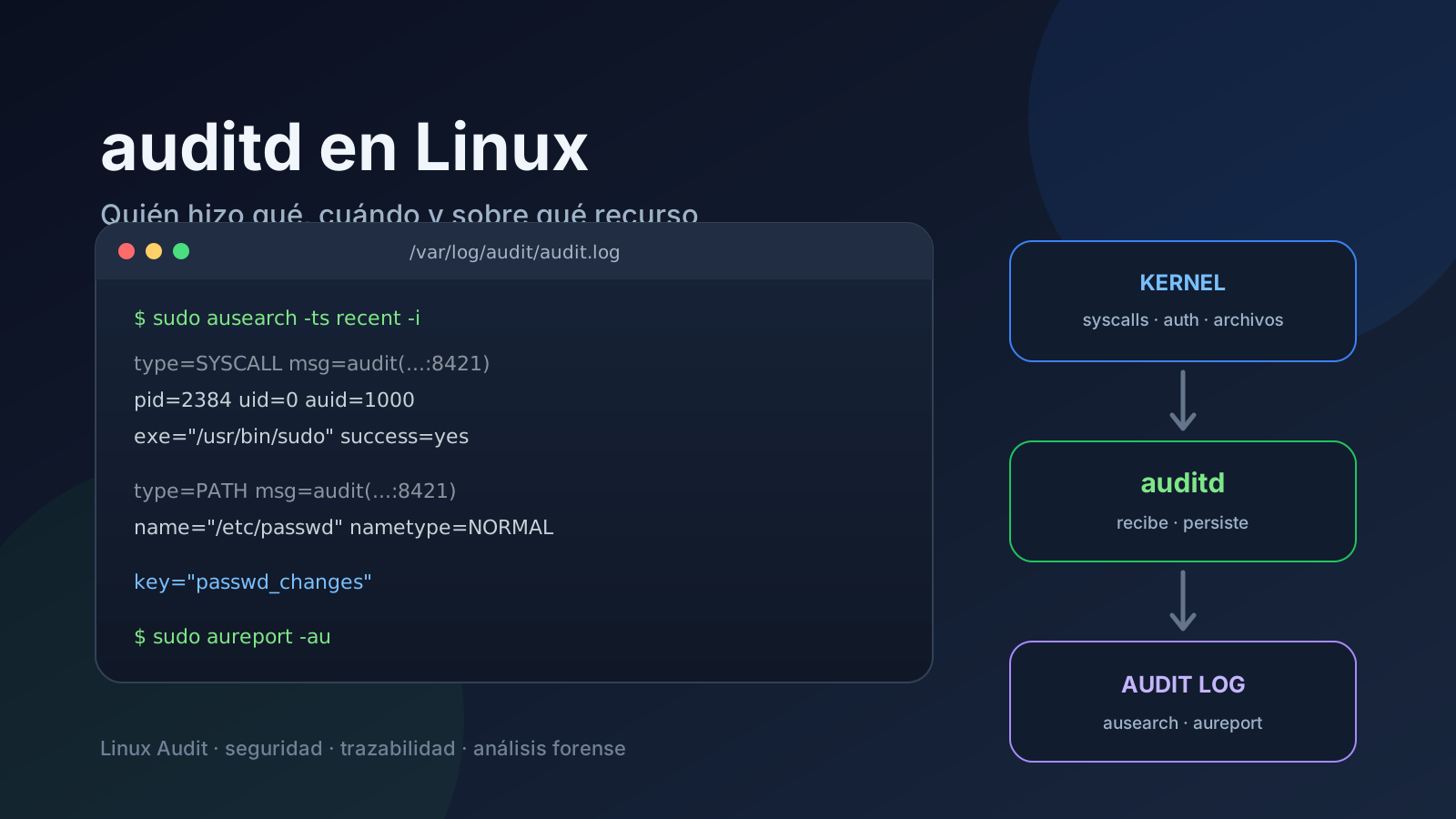
When we want to know what actually happened on a Linux server, traditional logs are not always enough. journald, syslog, or an application’s own logs may tell us that something happened, but not necessarily who opened a sensitive file, which process executed a system call, or which login identity was behind an action.
That is where Linux Audit and its userspace daemon, auditd, come in.
The core idea is simple:
auditdturns audit events produced by the kernel and other system components into a persistent record that can later be searched and investigated.
It is not a firewall, and it does not block attacks by itself. Its value is traceability: helping answer questions such as who did what, when, with which process, and against which resource.
A mental model: from the kernel to the log
A useful way to picture the flow is:
User / process
      │
      ▼
Linux kernel
      │
      ├── syscalls
      ├── file changes
      ├── authentication
      ├── security events
      └── audit rules
      │
      ▼
Linux Audit subsystem
      │
      ▼
auditd
      │
      ▼
/var/log/audit/audit.log
      │
      ├── ausearch  -> event queries
      └── aureport  -> summaries and reports
The auditd manual describes it as the userspace component of the Linux Auditing System responsible for writing audit records to disk. It also makes the division of responsibilities clear: ausearch and aureport are used to read the data, while auditctl controls the audit system and loads rules.
Where does auditd store events?
The usual location is:
/var/log/audit/audit.logBut it is better not to assume it blindly. The daemon is configured in:
/etc/audit/auditd.confYou can confirm the configured log file with:
grep '^log_file' /etc/audit/auditd.confA typical installation will show something similar to:
log_file = /var/log/audit/audit.logauditd.conf also controls important behavior such as rotation, maximum log size, and what to do when disk space is running low. This matters on servers because an aggressive audit policy can generate a significant event volume.
A common mistake: assuming one line equals one event
The Linux Audit format can look unusual at first because one logical event may consist of multiple records.
For example, one operation may produce several record types:
SYSCALL
CWD
PATH
EXECVE
PROCTITLE
They belong to the same event when they share the same identifier in a field similar to:
msg=audit(1788895200.123:8421)Conceptually, you can read it as:
1788895200.123 -> event time
8421           -> event number/serial
That is why simply running:
cat /var/log/audit/audit.logcan be useful for quick inspection but is not the best investigation method. The records belonging to the same event need to be reconstructed, and ausearch already understands that structure.
What the common record types mean
SYSCALL
Describes a system call and carries information about the process that made it.
It may include fields such as:
pid
ppid
uid
euid
auid
exe
success
exit
PATH
Identifies files or paths involved in the operation.
One event may contain more than one PATH record.
CWD
Shows the process’s current working directory.
EXECVE
Contains information about a program execution and its arguments when that kind of auditing is present.
USER_LOGIN, USER_AUTH, and related records
These help track authentication, sessions, and identity operations.
uid is not always the identity you want: pay attention to auid
One of the most useful investigation fields is auid, the Audit User ID.
Imagine that a user logs in and later uses sudo to run something as root. During the operation you may find:
uid=0because the effective process is running as root.
But auid can preserve the identity associated with the original login session. That difference is extremely useful when reconstructing administrative actions.
The practical mental model is:
uid / euid -> current or effective process identity
auid       -> audit identity associated with the login session
Not every event contains every field, but when they are present the distinction matters.
Before searching: confirm that auditd is working
Check the service:
sudo systemctl status auditdThen inspect the state of the audit subsystem:
sudo auditctl -sTo list the rules currently loaded:
sudo auditctl -lThis matters because auditd can only persist events generated by the kernel and requested by the relevant audit rules, in addition to events the system produces inherently.
Reading events with ausearch
ausearch is usually the most convenient entry point for investigating the logs.
Events from today
sudo ausearch -ts todayRecent events
sudo ausearch -ts recentLogin attempts
sudo ausearch -m USER_LOGINFailed login attempts
sudo ausearch -m USER_LOGIN --success no -iThe -i or --interpret option attempts to turn certain numeric values into a more readable representation.
Actions associated with an Audit User ID
For example, for auid 1000:
sudo ausearch -ua 1000 -iSearch by a key defined in an audit rule
sudo ausearch -k passwd_changesKeys are especially useful because they let you label rules with human-readable names instead of remembering complex syscall filters.
Creating a simple rule to watch a file
As an educational example, you can watch writes and attribute changes on /etc/passwd:
sudo auditctl -w /etc/passwd -p wa -k passwd_changesWhere:
-w /etc/passwd       -> watched resource
-p wa                -> write + attribute changes
-k passwd_changes    -> label used for later searches
Then:
sudo ausearch -k passwd_changes -iretrieves the related events.
There is an important distinction here: a rule added directly with auditctl is useful for testing and diagnostics, but persistent configuration is normally stored in rule files under:
/etc/audit/rules.d/and then compiled/loaded through the distribution’s Audit rule mechanism, commonly augenrules.
aureport: when you want the forest rather than every tree
ausearch is excellent for reconstructing specific events. aureport is better for summaries.
A general report:
sudo aureportAuthentication activity:
sudo aureport -auFile-related events:
sudo aureport -fCommands run, on versions that support that option:
sudo aureport --commA useful feature is that reports include event numbers that can then be used to return to the full detail with ausearch.
The workflow becomes:
1. aureport reveals something interesting
2. obtain the event number
3. ausearch retrieves the complete event
4. interpret SYSCALL + PATH + identity + process
auditd versus journald: they do not do the same job
It is better not to think of auditd as a replacement for journald.
journald is excellent for questions like:
What did this service report?
Why did this systemd unit fail?
What did the application write to stdout/stderr?
Linux Audit is designed for a different class of questions:
Which process touched this file?
Which identity was behind the operation?
Which syscall was executed?
Which audit rule caused this record to be generated?
A real investigation often uses both.
What should you audit on a server?
More rules do not automatically mean more security. An overly broad configuration can create noise, consume disk space, and make important events harder to find.
A reasonable starting point is to focus on high-value resources, for example:
/etc/passwd
/etc/shadow
/etc/sudoers
/etc/ssh/sshd_config
critical keys and configuration files
user and group changes
relevant administrative operations
The exact selection depends on the server’s role and threat model.
The audit logs themselves need protection
Audit records are useful only if they can be trusted.
A serious environment should also consider:
- permissions on the Audit directory and files;
- rotation and retention;
- available disk space;
- remote forwarding or centralization when the risk justifies it;
- alerts for especially sensitive events;
- a clear policy to prevent log volume from becoming an operational problem.
auditd even has configuration options for reacting to low-space situations or write failures. Those values should not be left to chance on critical systems.
A small investigation workflow
If you arrive at a server and want to understand its audit posture quickly, start with:
# 1. Is the daemon active?
sudo systemctl status auditd

# 2. Where does it write?
grep '^log_file' /etc/audit/auditd.conf

# 3. Which rules are loaded?
sudo auditctl -l

# 4. What happened recently?
sudo ausearch -ts recent -i

# 5. What does the overall summary look like?
sudo aureport

# 6. Which authentication events appear?
sudo aureport -au
Those few steps can already answer many questions that would be awkward to reconstruct from application logs alone.
The idea worth remembering
auditd is not simply “another log file.”
It is the userspace component of an auditing system that connects kernel events to persistent, searchable evidence.
The division of tools makes the model easier to remember:
auditctl  -> defines/controls what to audit
 auditd   -> receives and persists records
ausearch  -> searches complete events
aureport  -> summarizes activity
Whenever the question is “who did this on the server?”, Linux Audit is one of the first tools worth knowing how to query.
References
- Linux manual page:
auditd(8)— https://man7.org/linux/man-pages/man8/auditd.8.html - Linux manual page:
auditd.conf(5)— https://man7.org/linux/man-pages/man5/auditd.conf.5.html - Linux manual page:
ausearch(8)— https://man7.org/linux/man-pages/man8/ausearch.8.html - Linux manual page:
aureport(8)— https://man7.org/linux/man-pages/man8/aureport.8.html - Red Hat Security Guide: Searching the Audit Log Files — https://docs.redhat.com/en/documentation/red_hat_enterprise_linux/7/html/security_guide/sec-searching_the_audit_log_files