 Capital de Tokens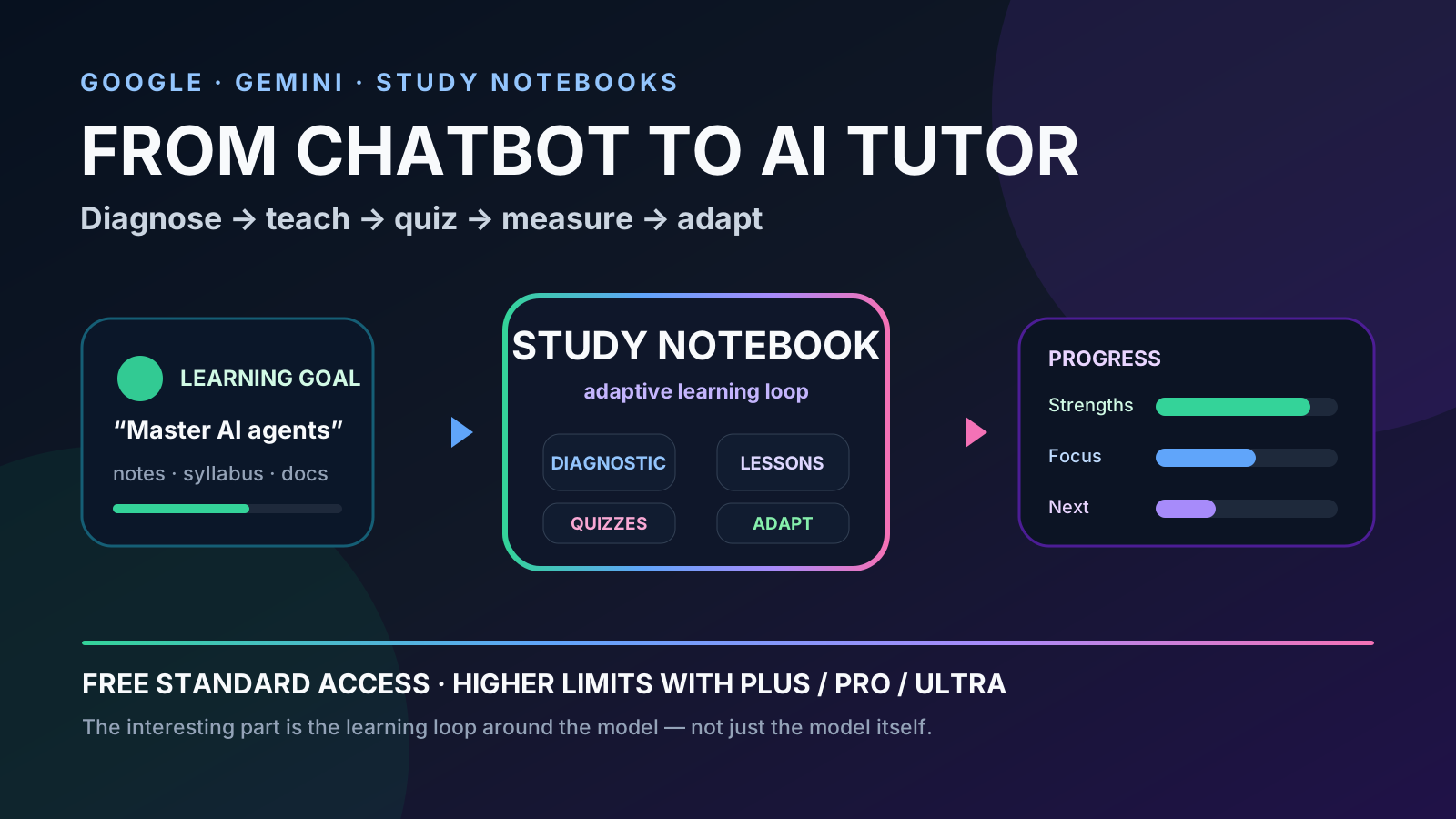
The phrase “Google launched a free AI professor” sounds like an exaggerated headline.
But this time there is something real behind it.
Google did not introduce a product literally called AI Professor. What it launched on June 25, 2026 was Study Notebooks in Gemini, an experience designed to turn Gemini into an adaptive learning platform.
The difference from a normal chatbot matters.
Instead of only answering questions, a Study Notebook can:
- ask what you want to learn;
- ingest your notes, syllabus or other materials;
- give you a diagnostic quiz;
- identify what you know and where your gaps are;
- build short lessons focused on those gaps;
- test you again;
- update the plan based on your results.
And since September 2026, Google has been connecting that experience even more tightly with Gemini Notebook, adding voice conversations, new quiz formats, audio recording and interactive learning summaries.
That is much closer to a personal tutor than a simple chat window.
First, a clarification: there is no product called “Google AI Professor”
It is useful to separate the informal label from the actual product name.
The central feature is Study Notebooks in Gemini.
Google describes it as a dedicated space that turns Gemini into an interactive and adaptive learning platform, with personalized lessons based on the learner’s goal, materials and results.
Official sources:
- Google: Supporting students with connected AI tools for more personalized learning
- Google: 5 ways to learn with study notebooks in the Gemini app
So when someone calls it a “free AI professor,” they are usually simplifying a combination of tools:
Gemini
  │
  ├── Study Notebooks
  │     ├── diagnostic
  │     ├── personalized plan
  │     ├── lessons
  │     ├── quizzes
  │     └── progress
  │
  └── Gemini Notebook / NotebookLM
        ├── sources
        ├── flashcards
        ├── summaries
        ├── infographics
        └── audio / video
It does not replace a human teacher, but it does automate several functions that previously required a tutor, an LMS and a set of separate study tools.
The most interesting part: it starts by evaluating you
Many educational chatbots work like this:
question → answerStudy Notebooks try to start one step earlier:
goal
  ↓
study material
  ↓
diagnostic quiz
  ↓
map of strengths and gaps
  ↓
personalized plan
Google says you can upload materials such as:
- a syllabus;
- notes;
- readings;
- class documents;
- other subject-related resources.
Gemini then generates a diagnostic quiz to establish a baseline.
That detail changes the experience significantly.
If you already understand lists, functions and classes in Python but struggle with concurrency and asynchronous programming, a useful tutor should not make you repeat “Hello World.”
It should detect the difference.
That is exactly the type of problem Google is trying to solve.
The notebook turns a goal into measurable skills
Google says the system can break a learning goal into more than 100 specific learning objectives, group them into topics and update progress as you complete quizzes.
The dashboard classifies areas such as:
Strengths
Focus areas
Not started
The idea is that the learner should not have to manually decide what to study next.
The system prioritizes the next lessons based on previous performance.
Conceptually:
               ┌───────────────┐
               │  final goal   │
               └───────┬───────┘
                       │
                split into skills
                       │
          ┌────────────┼────────────┐
          ▼            ▼            ▼
       mastered      partial       pending
          │            │            │
          └──────┬─────┴──────┬─────┘
                 │            │
               quiz       new lesson
                 │            │
                 └─────► update
                         progress
This matters because it changes the model from “ask me anything” into a learning loop.
General chatbot versus adaptive tutor
The difference can be summarized like this:
| General chatbot | Study Notebook |
|---|---|
| Answers the current question | Maintains a learning goal |
| Does not necessarily know your level | Starts with a diagnostic |
| Conversation may be linear | Organizes knowledge into objectives |
| You decide what to ask next | Recommends what to study next |
| Can explain a topic | Builds bite-sized lessons |
| Can make a quiz when asked | Uses quizzes to update progress |
| Course memory depends on context | Notebook preserves materials and progress |
The innovation is not that Gemini “can explain things.”
LLMs have been able to do that for years.
The interesting part is the orchestration around the model.
An example: learning AI agent engineering
Imagine that you want to study AI agents.
Instead of writing:
Explain what an agent is.
you could create a Study Notebook with a goal such as:
I want to learn AI agent architecture at a senior software engineer level. Evaluate me first and build a plan centered on my gaps.
Then add documentation or notes about:
tool calling
memory
RAG
planning
evaluation
guardrails
multi-agent systems
observability
retry policies
human-in-the-loop
The ideal flow would look like this:
1. Gemini tests you.
2. It detects that you already know APIs and tool calling.
3. It finds gaps in evaluation and memory.
4. It prioritizes those areas.
5. It generates a short lesson.
6. It asks questions.
7. It updates your progress.
8. It decides what you should study next.
That looks much more like a tutor than a traditional chatbot.
Where does NotebookLM fit?
Google’s naming can be confusing here.
During 2026 Google has increasingly connected Gemini, NotebookLM and Gemini Notebook.
Study Notebook sources can sync with NotebookLM / Gemini Notebook so the same material can be reused to generate artifacts such as:
- flashcards;
- quizzes;
- infographics;
- summaries;
- Video Overviews;
- other study materials.
A useful mental model is that the notebook acts as a persistent knowledge base while Study Notebooks provide the layer that organizes learning around a goal.
The September update: talk to your notes
On September 15, 2026, Google announced new learning tools for Gemini Notebook.
They include:
- real-time voice conversations with a notebook;
- answers grounded in the user’s sources;
- an audio recorder for lectures and ideas;
- interactive learning overviews;
- additional quiz formats;
- follow-up analysis of quizzes and flashcards;
- roughly 60-second Short Video Overviews.
Official source:
There is an important caveat: not every feature reaches every user at the same time.
For example, Google said real-time notebook conversations were starting with Google AI Ultra subscribers before expanding to Pro and others. Interactive learning overviews and new quiz formats, by contrast, were announced for all users during the rollout.
So it would be inaccurate to simply say “everything is free.”
So, is it free?
The accurate answer is:
there is standard access without a paid plan, but it comes with limits.
Current Gemini Notebook documentation distinguishes:
No plan       → standard limits
AI Plus       → 2× standard limits
AI Pro        → 4× standard limits
AI Ultra      → still higher limits
Sources:
In other words, Google is using a familiar freemium model:
usable free product
        +
compute limits
        +
paid plans for more capacity
You do not need to assume that Google AI Pro is required just to try the system and use it for ordinary study.
U.S. college students also have a separate promotion
Google also announced a promotion for eligible U.S. college students:
12 months of Google AI Pro at no cost.
According to Google’s September 15, 2026 announcement:
- it is for eligible U.S. college students;
- it can be redeemed through December 31, 2026;
- a valid payment method is required;
- after the free period, the plan renews at $19.99 per month unless cancelled first;
- it raises Gemini Notebook usage limits compared with standard access.
This is separate from the fact that standard Gemini Notebook access exists without Pro.
The promotion simply provides higher limits.
Where does Guided Learning fit?
Google also offers Guided Learning across its education ecosystem.
Its philosophy differs from a direct-answer chatbot: guide the learner step by step, ask questions and help them reach the answer rather than simply handing it over.
Study Notebooks and Guided Learning are complementary:
Study Notebook
= what you should learn and how you are progressing

Guided Learning
= how Gemini guides you through an explanation
The broader direction is clear: Google is building an education layer on top of Gemini instead of only adding an “explain this” button.
What should not be delegated to the tutor
An adaptive experience is not the same thing as an infallible one.
A system like this can still be wrong about:
- an explanation;
- a factual answer;
- the interpretation of a source;
- the difficulty of a question;
- whether you actually understand the topic.
A good learning architecture still needs verification:
AI tutor
   ↓
explanation
   ↓
exercise
   ↓
primary source / documentation
   ↓
real practice
   ↓
human review when needed
In programming, for example, learning should not end with “Gemini says I understand async.”
It should end with code that compiles, tests that pass and problems you can solve without assistance.
The real novelty is not the model
This may be the most interesting part from an engineering perspective.
You do not necessarily need to invent a special “teacher model.”
The architecture can be built around a capable LLM:
LLM
 +
sources
 +
diagnostic
 +
skill model
 +
planner
 +
quizzes
 +
progress tracking
 +
feedback loop
 =
adaptive tutor
That lesson applies far beyond education.
Many useful AI applications do not need a completely new model.
They need a harness around the model that turns a general capability into a specific workflow.
How to try it
The entry point is the Gemini app:
When Study Notebooks is available on your account, create one with a concrete goal and add your own materials.
A useful first experiment is:
I want to master this material.

Before teaching me:
1. create a diagnostic exam;
2. identify my strengths and gaps;
3. prioritize what I do not know;
4. teach me in short lessons;
5. test me after every block;
6. update the plan according to my results.

Do not mark a topic as mastered just because I say I understand it:
make me demonstrate it with questions or exercises.
That is where the difference becomes visible between using AI to receive answers and using AI to build a learning system.
Conclusion
Calling it a “free AI professor from Google” is a simplification.
But it is not as far from reality as it sounds.
With Study Notebooks, Google is trying to make Gemini more structured:
diagnose
→ teach
→ evaluate
→ measure
→ adapt
→ repeat
Standard access exists without a paid plan, while Plus, Pro and Ultra increase limits and some new features roll out to higher tiers first.
The most important change, however, is not whether we call it a chatbot, tutor or professor.
It is the mental-interface shift:
the AI stops waiting for the next question and starts managing a learning process.
Sources
- Google — Supporting students with connected AI tools for more personalized learning
- Google — 5 ways to learn with study notebooks in the Gemini app
- Google — Sharpen your study routine with new Gemini Notebook tools
- Google Help — Manage your Gemini Notebook usage limits
- Google Help — Upgrade Gemini Notebook