 Capital de Tokens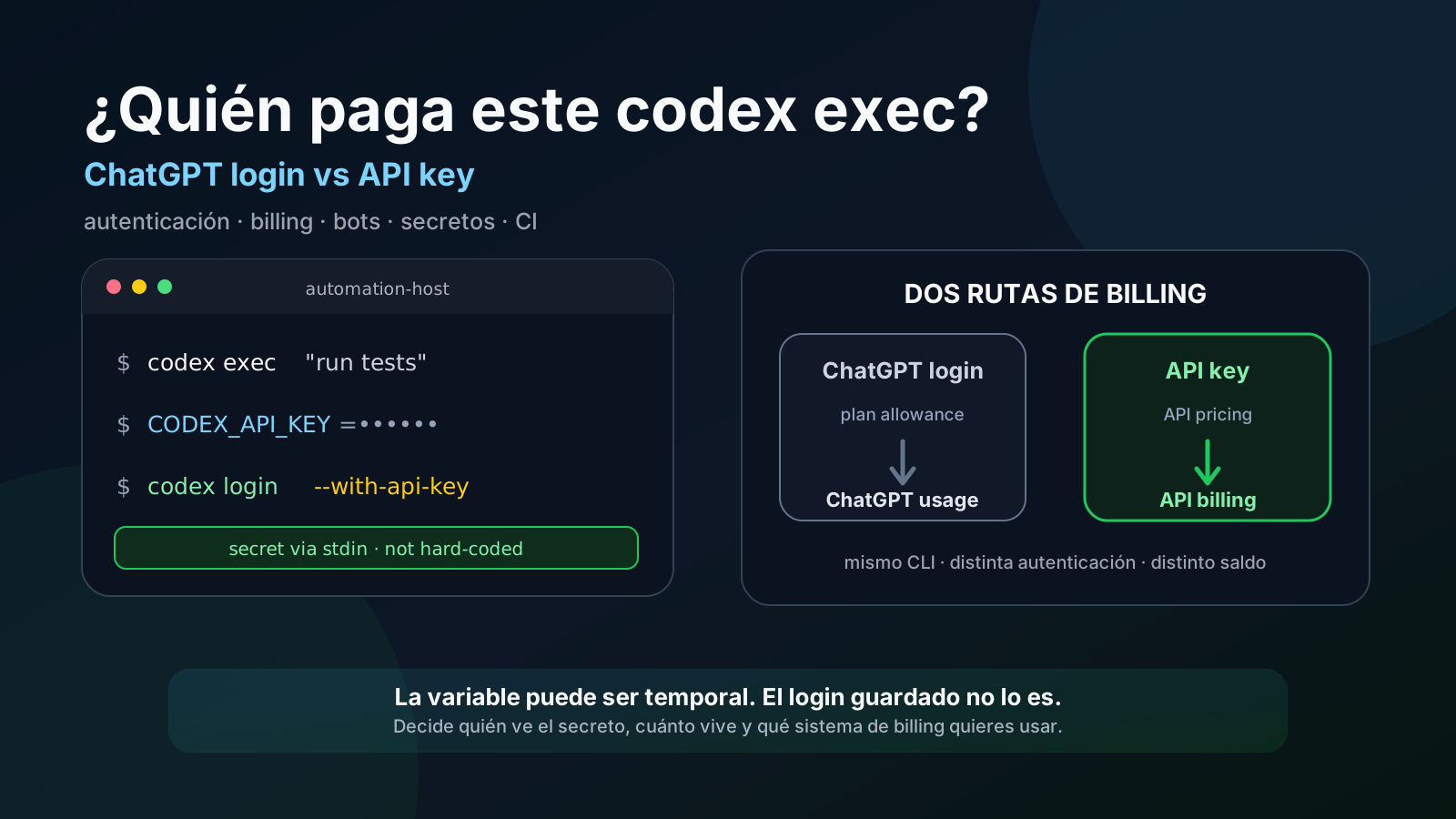
The same terminal command can look identical while consuming two different billing systems.
That distinction matters with Codex CLI.
If we run:
codex exec "review this repository"the relevant question is not only which model is being used. We also need to ask:
Is Codex authenticated with ChatGPT, or with an API key?
That determines where usage is billed.
According to OpenAI’s current documentation, signing in to Codex with ChatGPT uses the ChatGPT plan’s usage and billing, while using an API key uses standard API pricing.
But the difference is not only financial. ChatGPT sign-in applies ChatGPT workspace permissions, RBAC, and workspace data-handling policies; API-key usage follows the API organization/project policies instead. Also, Codex Cloud requires ChatGPT sign-in, and some features that depend on ChatGPT workspace access or cloud services can be limited or unavailable with API-key authentication.
That gives us a useful pattern for automation, servers, and bots: keep ordinary interactive Codex usage authenticated through ChatGPT, while running selected local jobs with an API key when we explicitly want them billed against the API platform balance.
This article shows how to do that without publishing real hostnames, organizations, project names, IDs, private paths, or credentials. Every example uses generic or redacted values.
First: there are two kinds of “credits” we should not confuse
OpenAI currently exposes credits in more than one product context.
ChatGPT / Codex usage credits
These can appear in ChatGPT or Codex usage settings and can extend supported features after the included plan allowance is exhausted.
OpenAI explicitly states that these are not API credits.
API platform credits
These appear in the billing area of platform.openai.com.
Conceptually:
API billing
  └── prepaid / granted API credit
            ↓
      OpenAI API requests
            ↓
       API key auth
If the balance appears in API Billing, the way to consume it from Codex is to run Codex with API-key authentication.
That is the most important distinction in this guide.
Case 1: use the API key for one codex exec
For an isolated job, there is no need to permanently replace your normal Codex session.
You can expose a credential only to the process that launches the command:
CODEX_API_KEY="$MY_OPENAI_KEY" \
  codex exec "summarize repository state without running project scripts"
The mental model is:
shell
  │
  ├─ normal Codex session → may remain signed in with ChatGPT
  │
  └─ this specific process
         │
         └─ CODEX_API_KEY
                ↓
             API billing
OpenAI documents this pattern for non-interactive automation: CODEX_API_KEY can be scoped to the particular codex exec invocation that needs it.
There is, however, an essential security boundary:
Use this pattern only when the code and commands Codex may execute are trusted.
Child processes can inherit environment variables. If codex exec ends up running tests, build scripts, hooks, lifecycle scripts, or any repository-controlled code that is not trusted, that code could attempt to read and exfiltrate CODEX_API_KEY.
So “the variable exists only for codex exec” does not automatically mean “the secret is invisible to everything Codex executes.”
Do not type the real key directly into shell history
This works technically:
CODEX_API_KEY='sk-proj-REAL-SECRET-HERE' codex exec "..."but it is poor operational hygiene on a server.
The key can end up in:
- shell history;
- troubleshooting logs;
- screenshots;
- issue comments;
- debugging output;
- accidentally committed scripts.
For an interactive shell, a safer pattern is to read it without echo:
read -rsp "OpenAI API key: " CODEX_API_KEY
echo
export CODEX_API_KEY

# Only for a task that will not execute untrusted code.
codex exec "inspect the repository"

unset CODEX_API_KEY
This keeps the literal key out of the typed command line, but it does not isolate the variable from child processes. If the task may run untrusted code, additional isolation is required.
Case 2: authenticate Codex once with codex login --with-api-key
Codex can also save API-key authentication.
The login command accepts the key through stdin:
printenv OPENAI_API_KEY | codex login --with-api-keyIf your variable is named CODEX_API_KEY, the same pattern becomes:
printenv CODEX_API_KEY | codex login --with-api-keyThen verify the active mode:
codex login statusand run Codex normally:
codex exec "analyze the project"The distinction from the previous method matters.
Temporary environment variable
CODEX_API_KEY="$MY_OPENAI_KEY" codex exec "..."The credential exists in that process environment and may be inherited by child processes.
Saved login
printenv CODEX_API_KEY | codex login --with-api-keyThe variable can disappear immediately afterward, but Codex keeps cached authentication credentials for later runs under that user.
In other words:
temporary variable
      ↓
codex login --with-api-key
      ↓
credential/token cached by Codex
      ↓
future codex exec runs
Saying “the variable existed only for the login command” does not mean the resulting authentication is temporary.
Can the variable exist only for the login command?
Yes.
For example:
CODEX_API_KEY="$MY_OPENAI_KEY" \
  sh -c 'printf "%s\n" "$CODEX_API_KEY" | codex login --with-api-key'
When that sh exits, the variable no longer exists in the parent shell.
But Codex has already saved the authentication state.
That is useful for provisioning:
secret injected
     ↓
one provisioning command
     ↓
codex login --with-api-key
     ↓
secret removed from environment
     ↓
Codex credential remains cached
Persistent login is still a secret
Removing OPENAI_API_KEY or CODEX_API_KEY from the environment does not remove credentials that Codex has cached.
OpenAI’s documentation says Codex can store cached credentials:
- in
~/.codex/auth.json; - or in the operating system credential store/keyring.
Storage can be controlled in config.toml:
# file | keyring | auto | ephemeral
cli_auth_credentials_store = "keyring"
For a long-lived bot, keyring is preferable when the operating system provides a reliable credential store. If file storage is used, treat ~/.codex/auth.json like a password: do not commit it, paste it into tickets or chats, and protect its permissions carefully.
There is also an isolation consequence: code running as the same operating-system user can try to access credentials that user is able to read. Persistent login should therefore be treated as a trusted-environment feature, not as a way to make arbitrary code execution safe.
If the workload includes untrusted repositories, pull requests, or scripts, use process/user separation or a CI mechanism designed so the secret is not directly exposed to repository code.
A reasonable manual pattern
To avoid typing the key in the command line at all:
read -rsp "OpenAI API key: " CODEX_API_KEY
echo
printf '%s\n' "$CODEX_API_KEY" | codex login --with-api-key
unset CODEX_API_KEY
Then:
codex login statusThis combines three useful properties:
- the key is not echoed while typed;
- it is not passed as a literal command-line argument;
- the shell variable is removed after authentication.
But the resulting login remains sensitive and should be stored only in a trusted environment.
Linux bots: the operating-system user matters
Imagine a generic Linux server where a bot periodically executes:
codex exec "inspect repository state"If you authenticate Codex under one account and the service runs as another, the bot may not have access to that authentication state.
The rule is:
Perform the login under the same system identity that will run
codex exec, but dedicate that identity to trusted workloads.
For example, if a service contains:
[Service]
User=automation
then the authentication needs to be available to automation, not only to some unrelated SSH user.
At the same time, avoid running arbitrary scripts from untrusted repositories under that same credential-owning user.
systemd: inject the key only into a dedicated trusted service
Another option is to provide the key to a service process through a restricted environment file:
sudo install -m 600 /dev/null /etc/example-bot.envConceptual contents:
CODEX_API_KEY=sk-proj-REDACTEDThen reference it from a systemd override:
[Service]
User=automation
EnvironmentFile=/etc/example-bot.env
NoNewPrivileges=true
Reload and restart:
sudo systemctl daemon-reload
sudo systemctl restart example-bot.service
This pattern is appropriate only when the service is dedicated and all code executed while the variable is present is trusted. EnvironmentFile does not create a vault around the secret: the variable becomes part of the service environment and may be inherited by descendant processes.
Therefore:
dedicated service + trusted code      → reasonable
service executing foreign PR/scripts  → do NOT inject the key this way
If the bot processes potentially hostile code, separate the component that owns the credential from the component that executes that code, or use an equivalent proxy/isolation mechanism.
Which approach is better for a bot?
There are two reasonable strategies for trusted environments.
A. Persistent Codex login
Provision once:
read -rsp "OpenAI API key: " OPENAI_API_KEY
echo
printf '%s\n' "$OPENAI_API_KEY" | codex login --with-api-key
unset OPENAI_API_KEY
Then the bot runs:
codex exec "..."Advantage: the original API key does not need to remain in the environment for every execution.
Risk: Codex keeps cached credentials. Use keyring when possible and protect the service user as a privileged identity.
B. Credential injected per run
A secret manager or infrastructure layer provides:
CODEX_API_KEYonly to the invocation that needs it:
CODEX_API_KEY="$MY_OPENAI_KEY" codex exec "..."Advantage: authentication stays externally managed and can be rotated without recreating a manual login.
Risk: descendants of that process can inherit the variable. Do not combine this pattern with untrusted code.
GitHub Actions: do not make the API key a job-wide environment variable
In CI, keeping the key in the platform secret store is necessary, but not sufficient.
This pattern is dangerous when the job checks out and executes repository-controlled code:
# Avoid in jobs that execute repository-controlled code.
env:
  CODEX_API_KEY: ${{ secrets.OPENAI_API_KEY }}
Tests, builds, hooks, dependency scripts, or a compromised action in the same job could read it.
For GitHub Actions, OpenAI’s current documentation recommends openai/codex-action@v1, which installs Codex and starts a proxy to reduce direct API-key exposure:
- uses: actions/checkout@v5
  with:
    persist-credentials: false

- name: Run Codex
  uses: openai/codex-action@v1
  with:
    openai-api-key: ${{ secrets.OPENAI_API_KEY }}
    prompt: |
      Review the change and propose the smallest necessary fix.
The important idea is that setup steps and repository code must not receive the key as a general job environment variable.
For CI systems other than GitHub Actions, the principle is the same: expose CODEX_API_KEY only to the component invoking Codex, and make sure untrusted code does not run in that same process environment.
API keys and untrusted code: a critical boundary
Keep two worlds separate:
component holding the secret
          │
          │ OpenAI call
          ▼
        Codex

untrusted code
          │
          └── should NOT be able to read the secret
This matters especially for:
- pull requests from forks;
- public repositories;
- third-party scripts;
- shared self-hosted runners;
- tasks where Codex runs tests or repository tooling.
Authentication answers who pays for the call. It does not automatically answer who can read the credential.
How to verify what you are using
Before automating, inspect the current login mode:
codex login statusOpenAI also supports clearing stored credentials with:
codex logoutDo not assume that an interactive shell session and an automated job necessarily use the same authentication path.
What happens when API credit runs out?
The API platform supports prepaid billing and configurable automatic recharge.
If available API funding reaches its limit and no additional billing capacity is available, API requests may stop processing until credit or payment capacity is restored.
That is separate from the usage included with a ChatGPT plan.
Operationally, keep these distinct:
ChatGPT / Codex usage
        ≠
API platform usage
A bot running with an API key can run out of API budget while the same account can still use Codex through ChatGPT, and the reverse can also happen.
Checklist for safe automation
Before putting codex exec into a bot or service:
- decide whether you want ChatGPT billing or API billing;
- remember that API-key auth does not provide exactly the same capabilities as ChatGPT sign-in;
- if you need Codex Cloud, use ChatGPT sign-in;
- for local API-billed automation, use API-key authentication;
- do not hard-code the key in versioned scripts;
- do not include it in issues, logs, or screenshots;
- avoid passing secrets as visible process arguments;
- do not expose
CODEX_API_KEYas a general environment variable in jobs that execute repository code; - in GitHub Actions, prefer
openai/codex-action@v1; - for persistent login, consider
cli_auth_credentials_store = "keyring"; - treat
~/.codex/auth.jsonlike a password when file storage is used; - remember that saved login state persists after the environment variable disappears;
- dedicate the service user to trusted workloads;
- isolate the credential from any untrusted code Codex may execute;
- monitor API billing separately from ChatGPT usage.
The main idea
The question “how do I use my API balance from codex exec?” first reduces to the authentication path:
Codex + ChatGPT login
        ↓
ChatGPT usage / billing
        +
workspace / cloud capabilities

Codex + API key
        ↓
API usage / billing
        +
local / programmatic workflows
But then a second question becomes just as important:
Which code can see the credential while Codex is working?
For an isolated trusted run, inject CODEX_API_KEY into only that process.
For a long-lived trusted bot, either authenticate Codex once with codex login --with-api-key and protect the credential store, or let infrastructure inject the variable only into the invocation that needs it.
For untrusted code, neither technique by itself provides isolation: the secret must be separated from the environment that executes that code.
The important thing is not memorizing one command. It is designing clearly who owns the credential, how long it lives, where it is cached, which process can see it, and which billing system we intend to use.