 Capital de Tokens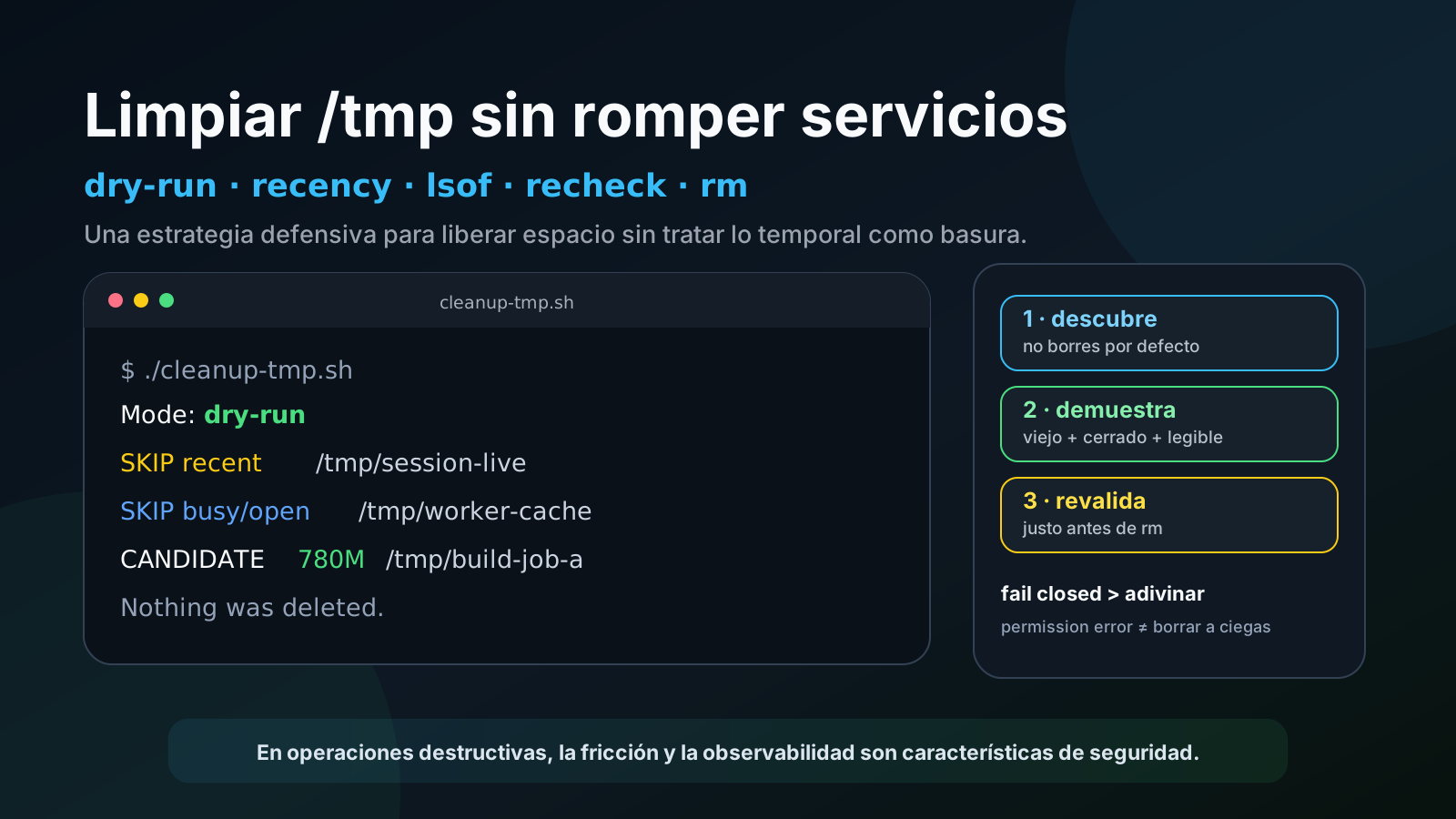
/tmp is one of those directories you rarely think about until the disk starts filling up.
Then the tempting fix appears:
rm -rf /tmp/*That is exactly the kind of fix that can turn a disk-space problem into a production incident.
On a Linux machine running builds, workers, services, developer tools, and long-lived processes, /tmp can contain a mixture of:
- genuinely disposable files;
- abandoned caches;
- stale build directories;
- active sockets and pipes;
- private directories created by
systemd; - lock files;
- temporary data that a process is still using;
- huge trees where only one descendant was modified recently.
So the useful question is not “how do I empty /tmp?” It is:
How can I gather enough evidence that something is probably safe to delete, review it first, and reduce the chance of removing something that is still alive?
This article distills a real cleanup-script design and hardening session. Machine names, users, project names, job names, repository names, identifiers, and infrastructure details have been removed or replaced. The sample sizes and paths are also deliberately changed so they do not describe a specific host.
Start by measuring, not deleting
Before touching anything, understand the problem:
df -h /
du -sh /tmp
sudo du -xhd1 /tmp 2>/dev/null | sort -h
A representative, intentionally altered example might look like this:
root filesystem: ~60 GB
used:            ~88%
/tmp:            ~3.4 GB
Inside /tmp you might see:
/tmp/build-job-a        820 MB
/tmp/build-job-b        760 MB
/tmp/media-cache-old    390 MB
/tmp/test-runner        600 MB
That still does not mean those directories are safe to remove.
Size tells you what occupies space. It does not tell you what is dead.
Rule 1: dry-run must be the default
The most important design decision was making the no-argument invocation non-destructive:
./cleanup-tmp.shIt only discovers candidates.
Actual deletion requires explicit intent:
./cleanup-tmp.sh --applyThis small interface decision changes the safety model. You can run discovery, inspect names and sizes, and only then decide whether to apply the cleanup.
A destructive script should require more intent to destroy than to inspect.
Rule 2: operate on direct children as units
Instead of walking all of /tmp and deleting individual stale files from arbitrary depths, the script treats each direct child as one unit:
find -P /tmp -mindepth 1 -maxdepth 1 -print0For example:
/tmp/build-job-a
/tmp/editor-cache-x
/tmp/session-123
If the whole tree appears safe, remove the whole tree. If any descendant is questionable, preserve the whole thing.
Consider:
/tmp/candidate
    ├── old.dat
    ├── cache/
    │   └── old.bin
    └── recent-activity.log
Even if almost everything is old, one recently modified recent-activity.log means the whole /tmp/candidate tree stays.
Rule 3: “old” must mean old across the entire tree
A common mistake is checking only the top-level directory mtime:
find /tmp -maxdepth 1 -mtime +2But a directory’s modification time does not necessarily track content changes inside files that already exist.
So the safer approach is a recursive check:
has_recent_content() {
  local path="$1"
  local minutes=$((MIN_AGE_DAYS * 24 * 60))
  local recent

  if ! recent="$(find -P "$path" -mmin "-${minutes}" -print -quit 2>/dev/null)"; then
    return 2
  fi

  [[ -n "$recent" ]]
}
Conceptually, the function has three outcomes:
0 → something is recent
1 → the inspected tree is old enough
2 → the tree could not be inspected reliably
That third state matters.
If find hits Permission denied, the conservative conclusion is not “it is probably old.” It is:
I cannot prove it is safe
        ↓
I do not delete it
For destructive cleanup, incomplete observability should normally fail closed.
Rule 4: protect system/session names and special nodes
Some /tmp entries should not be treated like generic garbage even when they appear old.
A reasonable protected-name list includes patterns such as:
.X11-unix
.ICE-unix
.XIM-unix
.font-unix
.Test-unix
systemd-private-*
snap-private-tmp
snap.*
ssh-*
tmux-*
Sockets, FIFOs, and other special nodes should also be skipped:
if [[ ! -f "$path" && ! -d "$path" && ! -L "$path" ]]; then
  echo "SKIP special: $path"
  continue
fi
The list is not meant to know every Linux application. It is another barrier layered on top of recursive age checks and open-file detection.
Rule 5: check whether processes still have files open
Old does not necessarily mean inactive.
A process can keep a file open for days without modifying it.
That is where lsof helps:
is_open_or_busy() {
  local path="$1"

  if [[ -d "$path" ]]; then
    lsof +D "$path" >/dev/null 2>&1 && return 0
  else
    lsof -- "$path" >/dev/null 2>&1 && return 0
  fi

  return 1
}
For a directory, lsof +D recursively scans the tree.
There is a cost: it can be slow on large directory trees. In testing, a complete dry run took noticeably longer than expected because of these recursive inspections.
For an occasional conservative cleanup tool, that can be a reasonable tradeoff:
slower
vs.
less likely to delete live data
The hardened version goes further: --apply refuses to run if lsof is unavailable.
if [[ "$MODE" == "apply" && $have_lsof -eq 0 ]]; then
  echo "ERROR: --apply requires lsof" >&2
  exit 1
fi
A dry run can still be informative, but destructive mode requires the extra evidence.
Rule 6: revalidate immediately before rm
There is an unavoidable race between:
inspect
  ↓
decide
  ↓
delete
A directory can be old and closed when inspected, then become active milliseconds later.
A Bash script cannot eliminate that race entirely. But it can narrow the window by repeating the checks immediately before deletion:
if has_recent_content "$path"; then
  echo "SKIP became recent: $path"
  continue
fi

if is_open_or_busy "$path"; then
  echo "SKIP became busy: $path"
  continue
fi

rm -rf --one-file-system -- "$path"
--one-file-system adds another guard: rm will not walk into a different filesystem that happens to be mounted below the candidate tree.
This does not make deletion atomic, but it reduces the blast radius.
A subtle bug: du produced two numbers
The first version measured bytes like this:
size_bytes="$(du -sb -- "$path" 2>/dev/null | awk '{print $1}' || echo 0)"It looks reasonable: if du fails, use zero.
But a command can produce useful output and still exit non-zero.
For example, du might calculate part of the tree and print:
49319then hit an inaccessible descendant and return an error. The echo 0 fallback also runs.
The variable becomes:
49319
0
Later:
((candidate_bytes += size_bytes))fails because the variable is no longer a valid integer.
The fix is to separate “capture whatever we can” from “validate the data before arithmetic”:
size_bytes="$(
  du -sb -- "$path" 2>/dev/null |
    awk 'NR == 1 { print $1; exit }' || true
)"

[[ "$size_bytes" =~ ^[0-9]+$ ]] || size_bytes=0
The broader shell lesson is useful:
cmd || fallbackinside command substitution can concatenate surprising output whencmdprints something before failing.
Validate the value you consume, not only the producer’s exit status.
Another bug: set -e turned one permission error into a full abort
With set -e, an early version simply ran:
rm -rf --one-file-system -- "$path"One candidate contained files owned by another user or service. rm returned Permission denied and a non-zero status.
Because of set -e, the entire cleanup script stopped there.
But the desired policy was: “delete what is safe and possible, report what is not.” One bad candidate should not prevent all other independent candidates from being cleaned.
So deletion became explicitly handled:
if rm -rf --one-file-system -- "$path"; then
  echo "REMOVED: $path"
  ((removed_count += 1))
else
  echo "WARN delete failed: $path" >&2
  ((delete_failures += 1))
fi
This is a useful reminder about set -euo pipefail: strict mode does not know your application policy.
An rm failure might mean:
fatal for the entire programor:
local item failure; record it and continueThe code must make that policy explicit.
Do not run as root accidentally
A cleanup script becomes far more dangerous when it has permission to delete almost anything.
The hardened public version refuses --apply as root unless explicitly opted in:
if [[ "$MODE" == "apply" && $EUID -eq 0 && "${ALLOW_ROOT:-0}" != "1" ]]; then
  echo "ERROR: refusing --apply as root" >&2
  exit 1
fi
This does not mean root is always wrong. It means privilege escalation should be visible and intentional.
The same idea applies to the target directory: the tool expects /tmp. Pointing it somewhere else should require an explicit override.
Output should support human review
A useful dry run explains why entries are skipped:
SKIP protected:   /tmp/systemd-private-...
SKIP recent:      /tmp/test-runner
SKIP busy/open:   /tmp/session-live
SKIP special:     /tmp/app.sock
SKIP scan error:  /tmp/restricted-tree
CANDIDATE 780M    /tmp/build-job-a
Then it ends with a summary:
Summary
  candidates: 900+
  estimated candidate bytes: ~2 GiB
  skipped by safety checks: 100+
  removed: 0
  delete failures: 0

Nothing was deleted.
Under --apply, the same summary distinguishes candidates, actual removals, and failures.
The resulting safety pipeline
The final cleanup design follows this sequence:
1. enumerate direct children of /tmp only
2. skip protected names
3. skip sockets/FIFOs/special nodes
4. recursively look for any recent content
5. if inspection is incomplete, preserve the tree
6. check open files with lsof
7. measure size for reporting only
8. display the candidate
9. under --apply, repeat recency and lsof checks
10. rm --one-file-system
11. handle per-candidate deletion failure and continue
That ordering matters more than any individual command.
What not to publish when sharing the script
Once a cleanup tool works well, publishing it as a reusable snippet is natural. The script itself may be generic while development logs still reveal infrastructure.
Before publishing, inspect both code and examples for:
hostnames
real usernames
public or private IP addresses
internal repository names
runner names
project-specific paths
cloud IDs
service URLs
tokens or credential fragments
personal email addresses in Git commit metadata
For public documentation, transform examples such as:
/tmp/<project>-issue-481
runner-prod-east-02
user@real-host
10.20.30.40
into something like:
/tmp/build-job-a
runner-example-01
user@example-host
192.0.2.10
192.0.2.0/24 is reserved for documentation, which helps avoid accidentally pointing at a real host.
Also inspect Git metadata, not just repository files. A perfectly sanitized README can still expose a personal email through author or committer metadata.
What this exercise taught us
Responsible /tmp cleanup turned out to be less about rm and more about evidence and failure policy.
The highest-value decisions were:
- dry-run by default;
- age checks across the full candidate tree;
lsofchecks for active use;- fail closed when inspection is incomplete;
- revalidate immediately before deletion;
- use
--one-file-system; - do not abort the whole cleanup because one candidate hits
Permission denied; - do not use root unless explicitly intended;
- treat logs and Git metadata as possible information leaks.
The result is slower than rm -rf /tmp/*.
That is the point.
For destructive operations, making them slightly inconvenient, observable, and conservative is often a feature rather than a flaw.