 Capital de Tokens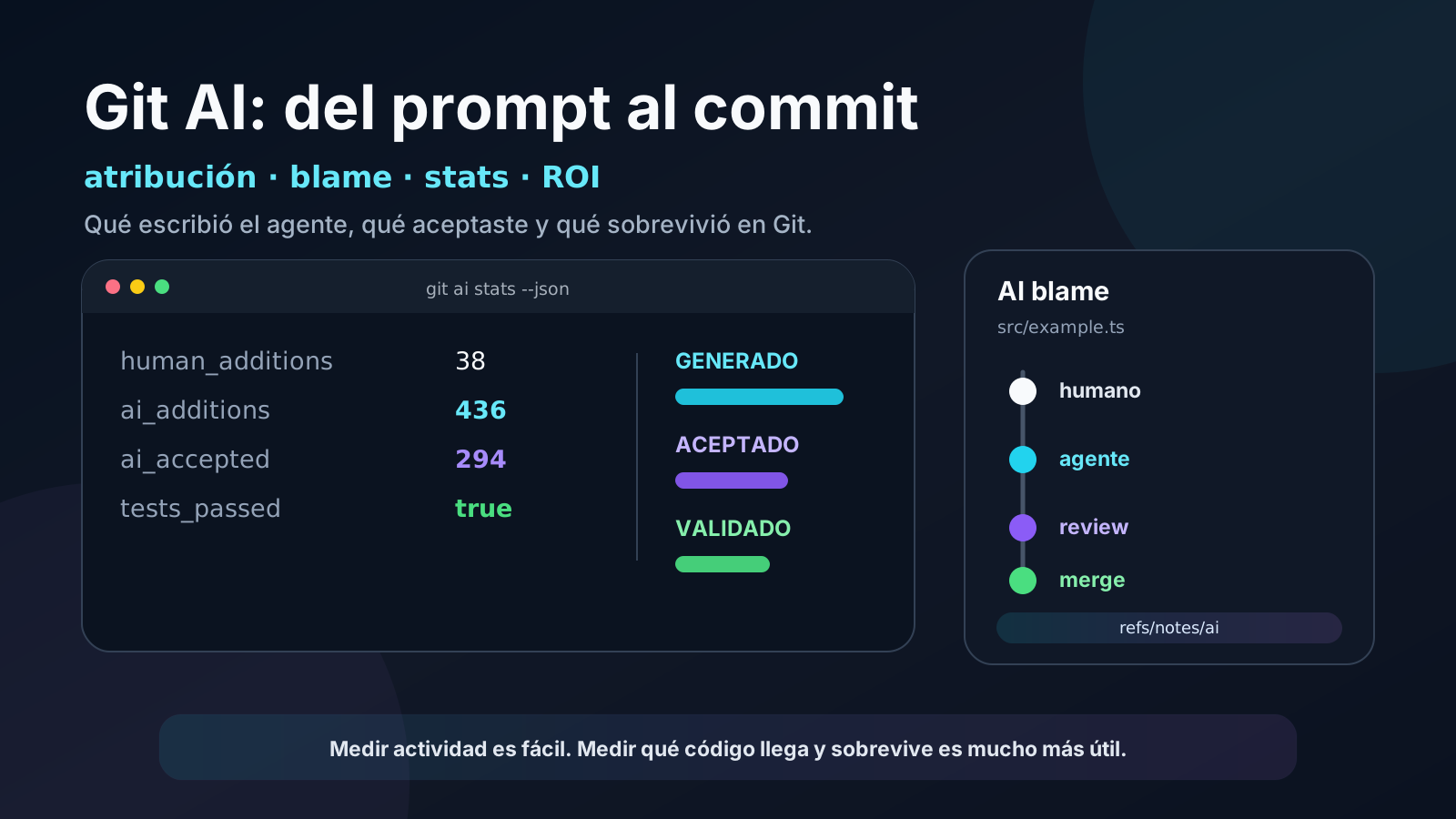
Coding agents can write hundreds or thousands of lines in a single session. The harder questions come later: how much of that code actually reached the commit, which lines survived review, which model produced them, and how much had to be rewritten by a human?
Counting prompts, sessions, or tokens measures activity. It does not necessarily measure value.
That is where Git AI comes in. Git AI is an open source Git extension that records line-level attribution for code generated by coding agents. Instead of trying to guess whether a line “looks AI-generated,” the agent itself marks the changes it made and Git AI records that provenance alongside repository history.
The project became even more relevant in September 2026 when Git AI announced that it is joining OpenAI’s Codex team. The team said it would keep investing in the open source project and in standards that let organizations compare agents and measure the return from AI-generated software.
This article shows how to use Git AI in practice, especially with Codex, without turning measurement into another source of noise.
Machine names, user names, private repository names, internal branches, IDs, private URLs, credentials, and operational figures in the examples were removed or deliberately replaced. Commands use generic names.
What problem Git AI solves
A traditional repository knows which commit introduced a line and which Git identity authored the commit:
git blame src/auth.tsThat becomes insufficient when one engineer directs several agents and later commits the result under a single human identity. Git sees one human author even when the contents were produced by multiple sessions, tools, or models.
Git AI adds another layer:
prompt
  ↓
agent
  ↓
file edit
  ↓
attribution checkpoint
  ↓
commit
  ↓
Git Note recording which lines were AI-authored
According to the documentation, supported agents checkpoint their work when they write or modify files. When the commit is created, Git AI consolidates those checkpoints into an authorship record under:
refs/notes/aiThat matters because it does not change the commit SHA or commit message. The metadata travels as a Git Note attached to the object.
Attribution can survive common operations such as:
rebase
cherry-pick
stash / pop
merge
merge --squash
commit --amend
reset
pull --rebase
Git AI describes the process as eventually consistent: after a history rewrite it may take a few milliseconds to reconstruct the corresponding note.
Installing Git AI
On macOS, Linux, or Windows through WSL:
curl -sSL https://usegitai.com/install.sh | bashOn native Windows there is a PowerShell installer:
powershell -NoProfile -ExecutionPolicy Bypass -Command "irm https://usegitai.com/install.ps1 | iex"Installation is per user, not per repository. You do not need to initialize Git AI inside every project.
After installation, restart any agent sessions or IDEs that were already open so they can pick up the installed hooks.
If you just installed a new coding agent or want to force integration setup:
git ai install-hooksGit AI maintains those integrations and checks them periodically.
Using it with Codex
Codex is explicitly supported by Git AI. Your normal workflow does not change:
cd ~/example-repo

codex exec "add request validation to the endpoint and update the tests"

git status
git diff
git add .
git commit -m "feat: validate request input"
You do not need to tell Codex to manually label each generated line. The integration uses agent hooks to associate edits with the session that produced them.
If Git AI was installed while Codex was already running, close that session and start a fresh one before testing.
First check: git ai stats
After a commit:
git ai statsFor automation, JSON is more useful:
git ai stats --jsonYou can also scope the calculation to a range:
git ai stats main..HEAD --jsonA simplified result can look like this:
{
  "human_additions": 24,
  "unknown_additions": 3,
  "ai_additions": 81,
  "ai_accepted": 56,
  "git_diff_added_lines": 108,
  "tool_model_breakdown": {
    "codex::example-model": {
      "ai_additions": 81,
      "ai_accepted": 56
    }
  }
}
Exact fields and model identifiers depend on the installed version and integration.
Git AI documents three categories for added lines:
human_additions
unknown_additions
ai_additions
and maintains the invariant:
human + unknown + AI = lines added by GitThat lets you distinguish “the agent generated a lot of code” from “a lot of agent-generated code actually reached the commit.”
ai_accepted does not mean “correct code”
This distinction matters.
If an agent generates 100 lines and 70 reach the commit, you can talk about an approximate 70% acceptance rate. That does not prove those 70 lines are good.
They may still:
- fail tests;
- introduce regressions;
- be unnecessarily complex;
- require substantial review changes;
- disappear two weeks later;
- contribute to a production incident.
Git AI improves provenance observability. It does not replace CI, code review, property tests, static analysis, production observability, or engineering judgment.
A more useful mental model is:
agent activity
      ↓
code generated
      ↓
code accepted
      ↓
code merged
      ↓
code that survives
      ↓
system outcome
The farther down that chain you can measure, the closer you are to measuring productivity rather than volume.
git ai blame: a blame view for humans and agents
Inspect a file with:
git ai blame src/auth.tsGit AI positions this as a drop-in replacement for git blame that preserves normal blame options while adding agent attribution.
Conceptually, the result may resemble:
commit-a  human              1) import ...
commit-a  human              2)
commit-b  Codex | model-x    3) function validate(...) {
commit-b  Codex | model-x    4)   ...
commit-b  Codex | model-x    5) }
commit-c  human              6) // follow-up fix
That makes previously awkward questions much easier to answer:
was this function written by a human or an agent?
which tool produced the lines I am reviewing?
how much of this file has been rewritten later?
There is also JSON output for building tools around the attribution data.
Inspecting the Git Notes directly
Git AI does not hide the mechanism. You can inspect notes directly:
git log --show-notes="ai"The note contains line mappings and session metadata. The open specification uses:
refs/notes/aiThis has an important architectural benefit: attribution is attached to Git and concrete commits rather than existing only in an external dashboard.
For teams that want to experiment without adopting a full platform, the notes plus git ai stats --json provide enough raw material to build internal metrics.
A five-minute experiment
The easiest way to understand Git AI is with a tiny repository:
mkdir git-ai-demo
cd git-ai-demo
git init

echo "# Demo" > README.md
git add README.md
git commit -m "docs: initial readme"

codex exec "add a short installation section to the README"

git add README.md
git commit -m "docs: add installation section"

git ai stats --json
git ai blame README.md
git log --show-notes="ai"
The goal is not to produce an impressive AI percentage. The test should answer three questions:
- Do the lines touched by the agent show up as AI-attributed?
- Do hand-written lines remain separate?
- Does the attribution survive the Git workflow your team normally uses?
If any answer is no, fix the instrumentation first. A dashboard built on incomplete attribution will only give you precise-looking bad data.
What happens with Squash and Merge in GitHub
There is a difference between running:
git merge --squash feature-branchlocally and clicking Squash and merge in a source-control web UI.
When the server creates the new commit, Git AI is not running there to reconstruct attribution. Git AI’s documentation says squash/rebase merges performed through GitHub, GitLab, Bitbucket, or Azure DevOps need either the Git AI platform or the open source CI actions to preserve attribution correctly.
For GitHub, Git AI provides:
git ai ci github installThe generated workflow runs after merge, installs Git AI, and reconstructs authorship on the resulting commit. It requires permission to write the notes reference:
permissions:
  contents: write
That deserves the same review as any workflow with write permissions. The important distinction is that the action is writing attribution metadata, not application branches.
Bringing stats into CI
A simple integration can run per PR or per commit:
git ai stats main..HEAD --json > git-ai-stats.jsonThe JSON can then be stored as an artifact or sent to an analytics database.
For example:
PR              AI add.   AI accepted   Human add.   Acceptance
feature-a          420          310            55        73.8%
feature-b          160          151            84        94.4%
feature-c          900          210            12        23.3%
The third case may be more interesting than the second. Perhaps the agent explored, rewrote, and discarded large amounts of code.
That does not automatically mean “bad model.” It may point to:
- ambiguous instructions;
- architecture that is difficult to discover;
- slow or missing tests;
- weak documentation;
- insufficient context;
- slow tooling;
- a task that was not decomposed well.
In other words, the metric can support harness engineering, not just model evaluation.
From AI percentage to ROI
A dashboard that says “82% of our code was written by AI” is easy to build and easy to misread.
A more mature evaluation combines several layers:
| Metric | Useful question |
|---|---|
% AI | How much agent-attributed code enters commits? |
| acceptance | How much generated code survives to commit? |
| review rework | How much needs to change before merge? |
| churn | How much disappears or gets rewritten later? |
| tests / regressions | Did the change preserve system invariants? |
| incidents | Did the code contribute to a production failure? |
| tokens / cost | What did it cost to reach the outcome? |
| human time | How much supervision did the agent need? |
The open source CLI covers commit-linked authorship well. Git AI for Teams adds joins with SDLC data, pull requests, model cost, rework, and incidents.
The direction matters more than any single number:
fewer tokens
+ less human intervention
+ less rework
+ same or better quality
= more effective agent
Privacy: local-first does not mean “nothing to review”
In open source mode without login, Git AI’s data privacy documentation says code, prompts, and agent usage data remain local. Prompts are stored in local SQLite.
There are still two details worth knowing.
First, error and exception telemetry is enabled by default in OSS mode and can be disabled through the telemetry_oss setting.
Second, attribution Git Notes are part of the repository and can be read by people with repository access. According to the documentation, those notes may include:
- agent and model;
- which lines were AI-generated;
- acceptance percentages;
- the Git identity —name and email— of the person who directed the prompt.
That means you should review metadata as well as content before publishing a repository or its notes.
Public examples should avoid leaking:
real host names
internal user names
cloud or job IDs
IP addresses
private URLs
paths that reveal projects
customer names
personal email addresses
API keys
tokens
credential fragments
And never use a real secret just to demonstrate how tracking works.
Limitations worth knowing
Git AI documents several current limitations, including:
git mvdoes not yet preserve attribution across renames correctly;git filter-branchandgit filter-repodo not reconstruct attribution through bulk history rewrites;- Bash commands run by an agent from outside the correct repository root can reduce attribution accuracy;
- squash/rebase merges performed by the provider’s web UI need CI or the platform to preserve notes.
It is also reasonable to treat model identifiers as observability data rather than a perfect guarantee. Integrations evolve, and there have been historical bugs where a model appeared as unknown even though line attribution itself was working.
A practical pattern for autonomous agents
If an agent repeatedly works through tasks, a measurable flow can look like this:
issue
  ↓
agent
  ↓
tests
  ↓
commit + Git AI attribution
  ↓
PR
  ↓
CI
  ↓
review
  ↓
merge
  ↓
production
For every task, you can persist something like:
{
  "task": "feature-example",
  "agent": "codex",
  "ai_additions": 436,
  "ai_accepted": 294,
  "human_additions": 38,
  "tests_passed": true
}
Later, join those records with PR duration, review effort, regressions, and cost.
The goal is not to rank “human versus AI.” The goal is to discover which combination of agent, model, context, tests, and workflow delivers useful changes with the least waste.
What Git AI joining OpenAI may signal
The September 2026 announcement points toward a clear direction for Codex: beyond making agents generate code, OpenAI wants better ways to measure what happens to that code afterward.
That matters because the next stage of software agents will not be decided only by who writes code faster. It will be decided by who can show:
what was generated
what was accepted
what was corrected
what reached production
what survived
what it cost
Git AI turns part of that traceability into data attached directly to Git.
For an individual developer, the useful starting point can be just two commands:
git ai stats --json
git ai blame <file>
For a team running autonomous agents, those same signals can become the first observability layer of an agentic software factory.